Interactive Mobile AR Anime Companion
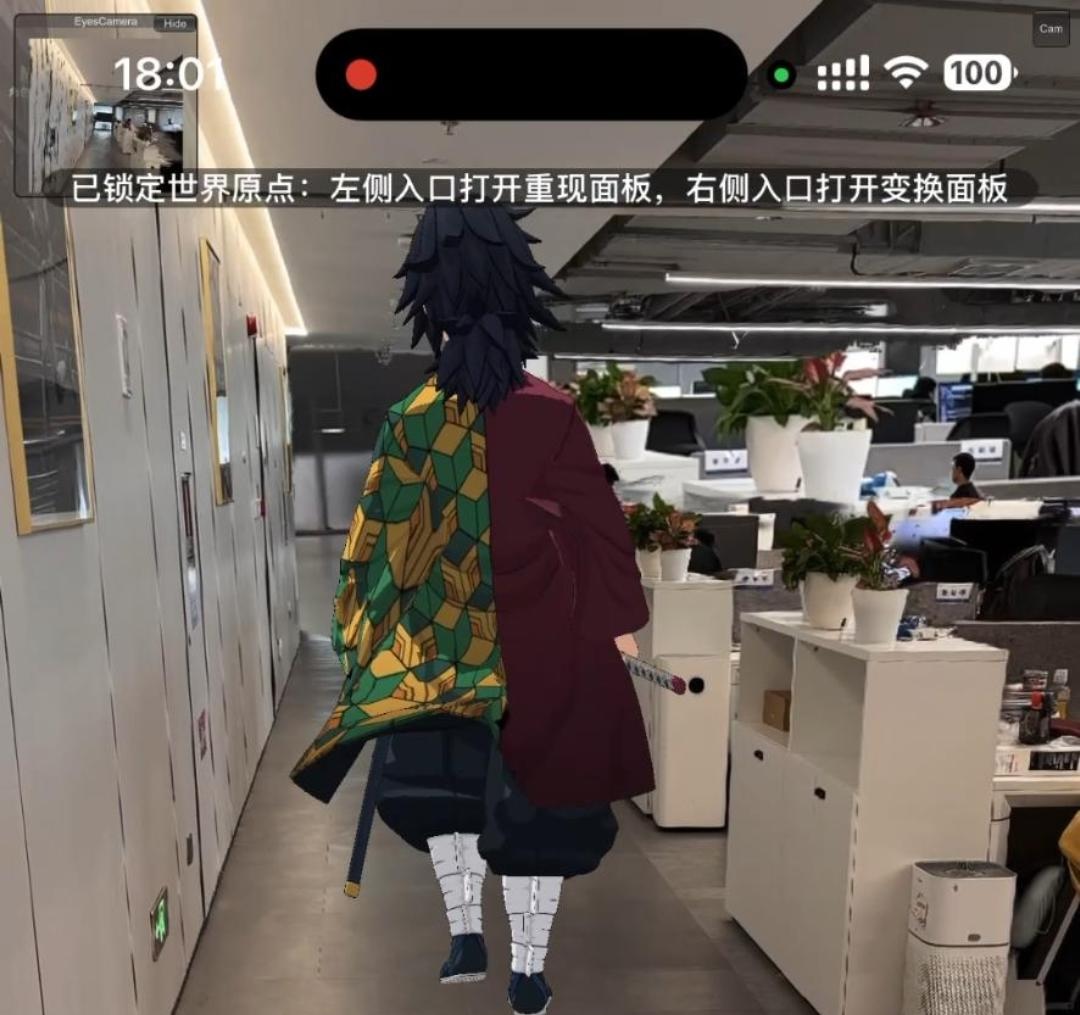
AR Companion is a very fascinating concept. Imagine someone or a character you like interacting and chatting with you in real space (automatically, continuously driven by models), with a real physical height and weight. The experience is much stronger than just chatting with a character on an app. After all, the character can move freely on a large scale in the AR space and has a perception of the real world.
In fact, I researched this project because I was unsure which direction (AI or Graphics) had pressing bottlenecks to solve. I felt that if I could build this project deeply enough, I would definitely find the most critical parts to break through. On the other hand, I also need this project to recognize more problems in AI and Graphics. Research is only meaningful when built upon real problems.
I chose Giyu Tomioka from “Demon Slayer” as a test character because “Demon Slayer” is a very popular anime with plenty of public resources online. Moreover, Giyu Tomioka has a moderate amount of screen time in the anime—neither too little data like a minor episodic character, nor overly complex scenes like the main protagonist.
To achieve the ultimate goal, this project is destined to be massive. Therefore, I broke it down into two subprojects: one is data processing (server-side), and the other is spatial perception and interaction (client-side).
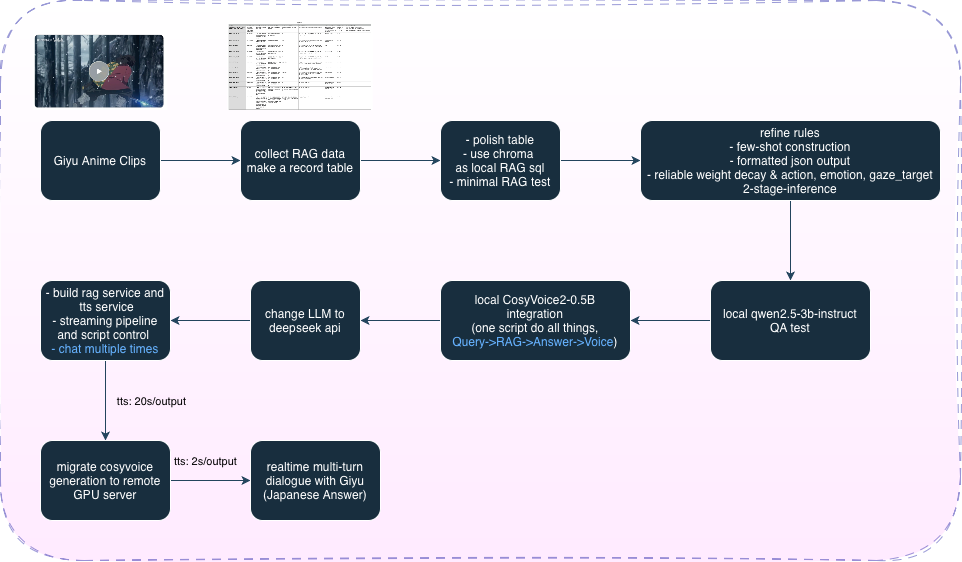
The server first extracts dialogue and other information from original anime clips, organizes it into a table, and then uses local Chroma for RAG (connecting to an API or Ollama for answer generation; this part requires tweaking many things to achieve good RAG performance). After the answer text is generated, it connects to CosyVoice for voice generation (inferencing from the original anime audio). Finally, it’s converted into a service. Specifically, RAG still uses a local database but connects to the DeepSeek API for fast, high-quality generation, built as a resident service that can be started and stopped. Meanwhile, CosyVoice is deployed and service-enabled on an Ubuntu server (accelerated by an RTX 4090). Then, a Cloudflared tunnel is set up for each service. After this deployment, a mobile phone can run these two services anywhere with a network, completely getting rid of the dependency on a PC.
On the other hand, for the client, I chose to use Unity as a Library to embed the Unity framework into Swift development. The advantage of this approach is the convenience and flexibility of using advanced features from Apple’s native RealityKit and ARKit. The downside is that the latency in data transmission between Unity and Swift is higher than if the project were built directly in Unity. I still recommend building this kind of project directly in Unity for convenience and better results, adding Swift components only later when Unity encounters parts that are hard to solve.
First, the standard pipeline. I found a high-quality 3D model of Giyu Tomioka (FBX, rigged) online. I imported it into Mixamo to get the standard T-pose, downloaded it back into Unity to map an avatar to a Humanoid rig, and then downloaded multiple unskinned animations from Mixamo to apply to this Humanoid rig. I used MagicCloth2 to add bone-driven physics to the hair, haori, etc. (I didn’t use point-driven physics because the haori isn’t single-sided and cannot be split, making weight painting inaccurate). At the same time, I converted the model’s materials into anime-style materials and sketched out a basic animation state machine.
Next is the AR scene setup stage. Specifically, this aligns the phone’s camera with the camera in Unity space, and aligns the world origin and XOZ plane in Unity (Unity is y-up) with the origin and plane selected by the user in the AR scene. This part is quite tricky; a series of matrix transformations are required to rotate the phone camera’s view to the correct orientation (character feet pointing down) and establish the correct relationship where objects appear larger when close and smaller when far. After implementing this, if the character still drifts with the camera, it requires a combined transformation of the camera’s position relative to the origin and the character’s relative position to the camera, inversely transforming the character every frame to an absolute position relative to the origin to decouple them from the camera view (it would probably be much easier to use Unity’s AR Foundation). In this way, the character can move freely on a large scale in the overlapping space, and the observer can view them from different angles, near or far.
Finally, I built a SwiftUI app, filled the two services into the configuration, and all that’s left is to send messages on the interface and wait for a reply (real-time is still unachievable; it takes about 10 seconds to wait for voice generation, but most of the time is spent on the LLM’s API calls). Additionally, I improved optimizations by adding lip-sync animation while the character is speaking, gaze locking (looking at the user by default), and character shadows.
This project is considered quite complete now. Deeper research can be conducted when integrating with new tasks in the future.